Summary
This report presents the development and usage of a custom-built software application designed for tagging and coding events in inline skater hockey matches. The primary goal of the project was to create an intuitive tool for recording match data, and facilitating data analysis and visualization. The software enables users to input event details and export the data for further analysis, supporting performance evaluation and informing strategies for future matches. The report provides an overview of how to use the application for event tagging and data export, followed by an example analysis of a real match between Great Britain and Austria. The conclusions drawn from the analysis demonstrate how, even with limited data, valuable insights can be obtained about team performance. This underscores the software’s value as a tool for sports analytics.
Introduction
Data has become a crucial asset for organizations across various industries, allowing them to make informed decisions, optimize processes, and gain a competitive edge. The ability to leverage big data and analytics has proven to be a significant factor in the success of organizations. As LaValle et al. (2011) argue, the use of big data and analytics enables organizations to derive actionable insights, improving decision-making processes and ultimately creating value. This trend has extended to the world of sports, where data is increasingly used to inform performance strategies and predict outcomes.
In sports, analytics have revolutionized the way teams evaluate performance. Historical data and advanced statistics allow coaches and analysts to measure player performance, predict match outcomes, and make tactical decisions that provide an advantage over competitors (Pantzalis & Tjortjis, 2020). Data-driven insights enable teams to assess individual players’ strengths and weaknesses, optimize roster composition, and adjust in-game strategies to maximize team value (Sarlis & Tjortjis, 2020). This approach has led to improved decision-making and budget efficiency, demonstrating the value of performance analytics in sports.
However, not all sports have equal access to data analytics tools. The high costs associated with advanced information technology infrastructure have created a divide between data-rich and data-poor sports (Hutchins, 2016). Many smaller organizations, such as the British Inline Skater Hockey Association (BISHA), lack the funding required to purchase video analysis software to generate real-time match data. This financial limitation has restricted their ability to analyse player and team performance effectively.
To address this gap, this project involved the development of a simple software tool for event tagging in inline skater hockey matches. The tool provides a cost-effective solution for capturing key match events, such as passes and shots, without requiring expensive video analysis software. The data generated can be used for performance analysis and visualization, assisting coaches and analysts in making informed decisions. The tool offers BISHA a practical method for gaining insights into team strategies and improving overall performance.
Discussion
Using the Software Application
The event tagging tool was developed in Python, using the Tkinter library for creating the graphical user interface (GUI). Python is a dynamic, object-oriented, high-level programming language that is particularly popular among data scientists due to its extensive library support and flexibility. Its influence in the field of sports analytics has been growing, as Python provides a wide variety of functionalities that support the entire analysis process, from data collection to visualization (Klemp, 2024). Tkinter, which is included in the Python Standard Library, was chosen for its simplicity and ease of use. It is a lightweight and portable graphical toolkit that enables the rapid development of user-friendly GUI applications (Moore, 2018; Python Software Foundation, n.d.).
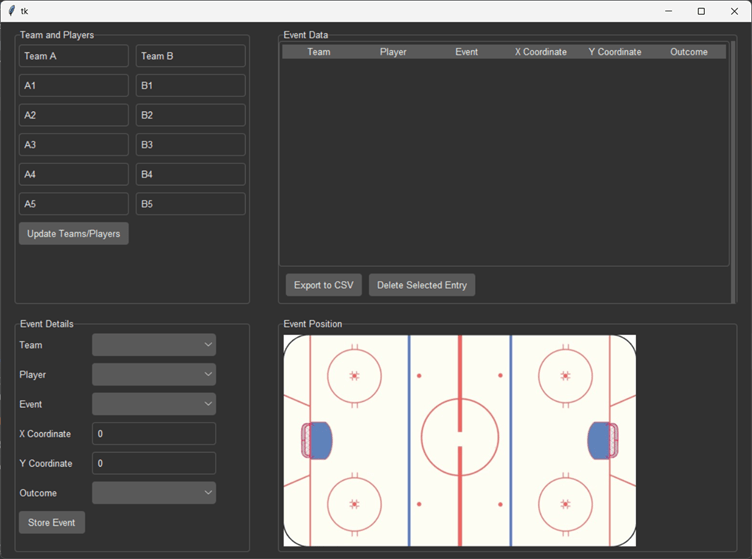
The software consists of four main interfaces:
- Team/Player Setup: Users can input or edit team and player names by clicking on the text boxes and replacing the default values. Once updated, clicking the “Update” button saves the changes.
- Event Details Interface: Users enter event-specific details such as the team, player, type of event (shot or pass), and the event outcome (e.g., goal, save, off-target).
- Event Position Interface: Users select the location on the rink where the event occurred by clicking on the rink image, which automatically records the X and Y coordinates.
- Event Data and Export: The tagged events are stored in a list. Users can review the list of events and export the data to a CSV file.
Check out the code here: https://github.com/sid7-s/Event_Tagger
Step-by-Step Walkthrough for Tagging Events
Step 1: Set Up Team and Player Names
Begin by entering the names of the teams and players in the designated text boxes. Each text box allows modification of the default names, enabling the user to input the correct team or player information. After making the necessary updates, select the “Update” button to apply these changes, ensuring that all future events are accurately tagged with the appropriate team and player data.
Step 2: Enter Event Details
Use the Event Details interface to select the team, player, and event type from the dropdown menus. The event type allows selection between “shot” and “pass.” Depending on the selected event, the user may specify the outcome:
- For a pass: Choose between “Successful” or “Unsuccessful.”
- For a shot: Choose from “Off Target,” “Saved,” “Blocked,” or “Goal.”
Step 3: Select the Event Position on the Rink
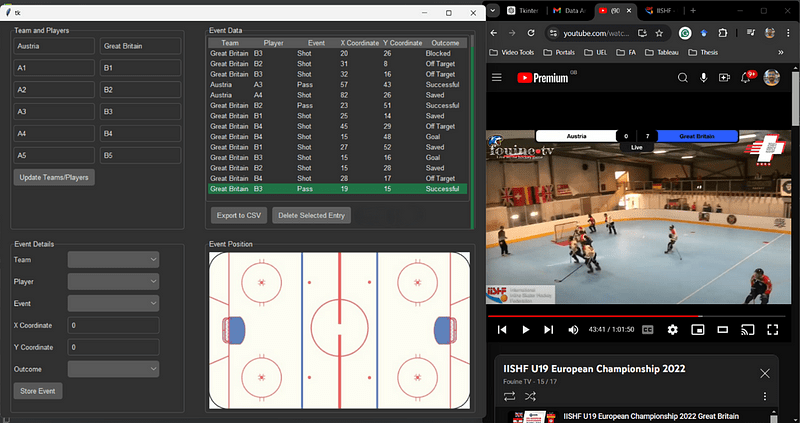
After entering the event details, the user should click on the image of the rink to specify the event’s location. Upon clicking the image, the X and Y coordinates will automatically update from the default value of (0,0) to reflect the actual location of the event. This spatial data enables a detailed analysis of event positioning throughout the match.
Step 4: Store the Event
Once the event details and location have been entered, the user should select the “Store Event” button. This action will add the event to the Event Data section, where all tagged events are displayed for review.
Step 5: Export Data
The user should continue tagging events until all relevant match data has been recorded. Once the tagging process is complete, selecting the “Export to CSV” button will save the data as a CSV file, which can then be used for further analysis or visualization.
Additional Information for Users
- Deleting Events: If an event has been entered incorrectly or needs to be modified, the user can select the event from the Event Data list and click the “Delete Selected Entry” button. This will remove the selected event from the list, ensuring only accurate data is saved.
- Handling Substitutions: During the match, substitutions may occur, requiring the user to update the player lineup. In such cases, the user can edit the name of the substituted player and replace it with the name of the player who has entered the game. After updating the name, click the “Update” button to apply the changes. The new player will now be available in the dropdown list to tag future events.
Match Analysis
The event tagging tool was used to record shots and passes leading to shots in a match between Austria and Great Britain during the IISHF U19 European Championship 2022.
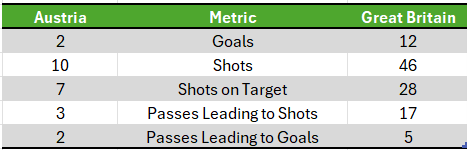
Analysis of the overall match statistics clearly shows that Great Britain was the dominant team, with superior metrics — more goals, shots, and passes leading to shots. Despite Great Britain’s dominance, Austria created a few opportunities, converting two of them into goals.
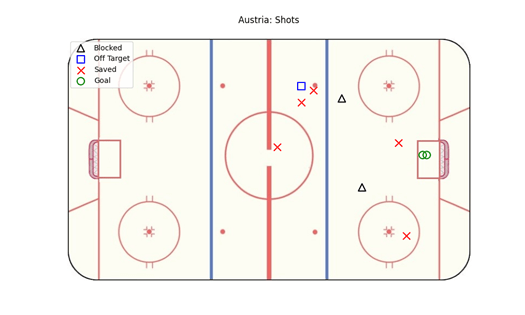

Austria managed only three shots from close to the goal, with the rest taken from long range. Notably, two of the close-range shots were goals, highlighting Austria’s effectiveness when in high-probability scoring areas. However, Austria’s reliance on long-range attempts reflects their difficulty in penetrating Great Britain’s defence and generating high-quality chances in central areas. This aligns with research showing that shots closer to goal from central positions have a higher success rate (Djup, 2023).
In contrast, Great Britain’s shooting strategy was more balanced, mixing long-range and close-range efforts. Importantly, eight of their 12 goals came from close to the goalpost in central areas, underscoring their ability to create high-quality chances and dominate offensively. This pattern further demonstrates Great Britain’s tactical superiority, as they consistently broke down Austria’s defence to generate dangerous opportunities.
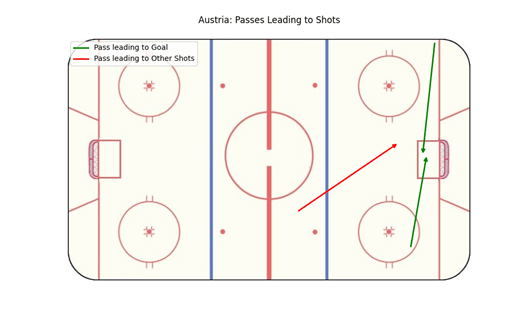
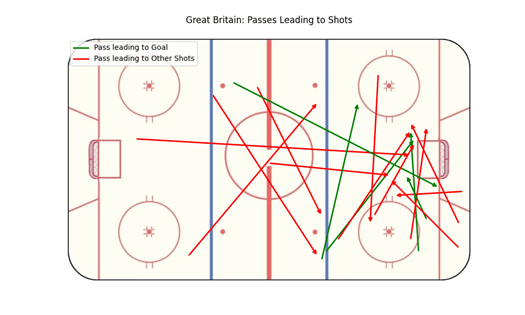
Visualization of the passes leading to shots revealed an interesting spatial pattern. Most of Great Britain’s passes that led to shots came from the right side of the pitch, while their shots predominantly originated from the left. This suggests a tactical approach that involved building plays on the right side, then crossing or switching the ball to create shots from the left. The use of visualization in competitive sports data analysis has been shown to enhance an intuitive understanding of such patterns (Du & Yuan, 2021).


Examining the timeline of events provides insight into Austria’s two goals, particularly in the context of match state. In the first half, Austria’s offence was largely ineffective, managing just 3 shots, only 1 of which was on target. Great Britain’s defence consistently neutralized Austria’s attempts, preventing them from creating meaningful chances. Austria’s inability to threaten Great Britain’s goal was evident, as they struggled to find space near the goal due to relentless pressure.
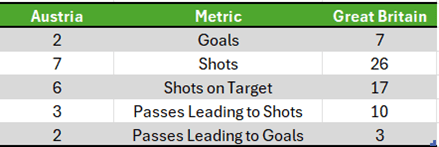
In the second half, Great Britain maintained control, increasing their shot count, and scoring more goals. Austria, however, began creating more chances as the game progressed. This shift can be attributed to the match state — Austria’s first goal came after they were already 8–0 down. By this point, Great Britain’s victory was all but secured, underlining Austria’s inability to create meaningful chances until the game was practically over.
Conclusions
The event tagging tool developed during this project proved to be an effective and accessible solution for tracking key match events in inline skater hockey. Its simplicity and usability make it particularly valuable for organizations that lack the resources to invest in advanced video analysis tools. The ability to tag events, export data, and visualize key metrics provides valuable insights into team performance, helping coaches and analysts make informed decisions.
The analysis of the match between Great Britain and Austria using the tool demonstrated clear patterns in both teams’ performances. Great Britain’s superior offensive strategy and shot quality were evident through the high number of goals scored from central, close-range areas, while Austria struggled to create meaningful chances, often relying on long-range attempts. The tool’s ability to generate data that visualizes passes and shot locations allowed for a clearer understanding of Great Britain’s effective use of the right side of the pitch to build attacking plays. The ability to extract these insights from just two types of events using a simple tool highlights the power of data in making informed decisions (Diván, 2017; Provost & Fawcett, 2013; Fried & Mumcu, 2016).
In summary, the event tagging tool not only provided a structured method for capturing match data but also enabled a deeper analysis of team strategies and performance. The insights drawn from the data emphasize the importance of using analytics to inform tactical decisions and improve team outcomes, even in sports with limited data infrastructure.
References
Diván, M.J., 2017, December. Data-driven decision making. In 2017 international conference on Infocom technologies and unmanned systems (trends and future directions)(ICTUS) (pp. 50–56). IEEE.
Djup, P., 2023. Exploring Key Factors in Goal Success: Evaluating Power Play Shots and Pre-shot Events in Ice Hockey Using Random Forest.
Du, M. and Yuan, X., 2021. A survey of competitive sports data visualization and visual analysis. Journal of Visualization, 24, pp.47–67.
Fried, G. and Mumcu, C. eds., 2016. Sport analytics: A data-driven approach to sport business and management. Taylor & Francis.
Hutchins, B., 2016. Tales of the digital sublime: Tracing the relationship between big data and professional sport. Convergence, 22(5), pp.494–509.
Klemp, M., 2024. Python. In Computer Science in Sport: Modeling, Simulation, Data Analysis and Visualization of Sports-Related Data (pp. 125–131). Berlin, Heidelberg: Springer Berlin Heidelberg.
LaValle, S., Lesser, E., Shockley, R., Hopkins, M. S. and Kruschwitz, N., 2011. Big data, analytics and the path from insights to value. MIT Sloan Management Review, 52(2), pp.21–32.
Moore, A.D., 2018. Python GUI Programming with Tkinter: Develop responsive and powerful GUI applications with Tkinter. Packt Publishing Ltd.
Pantzalis, V.C. and Tjortjis, C., 2020, July. Sports analytics for football league table and player performance prediction. In 2020 11th International Conference on Information, Intelligence, Systems and Applications (IISA) (pp. 1–8). IEEE.
Provost, F. and Fawcett, T., 2013. Data science and its relationship to big data and data-driven decision making. Big data, 1(1), pp.51–59.
Python Software Foundation. Tkinter — Python interface to Tcl/Tk. Retrieved from https://docs.python.org/3/library/tkinter.html
Sarlis, V. and Tjortjis, C., 2020. Sports analytics — Evaluation of basketball players and team performance. Information Systems, 93, p.101562.
 Sidharth Suresh
Leave a comment